What is Zscaler MDR?
Zscaler MDR provides a security operations platform that proactively monitors for malicious and suspicious behaviors and responds to stop them from becoming serious security incidents. The platform works via several key components:
Endpoint and cloud workload sensors/agents
Alert collectors and integrations with your alert-generating security products
Integrations with your cloud service providers, identity platforms, and SaaS applications
Cloud-hosted collection, detection, and response platform
Our Cyber Incident Response Team (CIRT)
Our Threat Hunting team
The endpoint/cloud workload sensors run on the endpoints and cloud workloads that make up your corporate and production environments, collecting detailed telemetry about what is happening in those systems.
The telemetry and alerts from your cloud service provider, identity platforms, SaaS applications, and other security products are both sent to our cloud-hosted platform. This allows our CIRT to perform analysis of that data to identify and confirm suspicious activity and security incidents. The included security orchestration and response capabilities can execute automations using playbooks on endpoints for response and remediation.
Your Zscaler MDR incident handler assists and coaches your team about ways to improve your security program and reduce your risk through reporting, prevention recommendations, and deeper integrations between your other security products.
Note that for the Zscaler MDR platform to work, you must meet the requirements listed for each subscription:
MDR Endpoint
One or more of the following:
Purchase supported endpoint detection and response (EDR) software from a third party
Purchase supported third-party EDR software from Zscaler MDR
Subscribe to the Linux EDR component of the Zscaler MDR platform
MDR Identity
Integrate a supported identity platform technology with Zscaler MDR
MDR Cloud
Integrate a supported cloud service provider with Zscaler MDR
Detecting Potential Threats
Zscaler MDR’s detection process uses two primary classes of analytics:
Every piece of telemetry is tested to determine if it matches an indicator of compromise (IOC) that we’ve seen or heard adversaries use.
Behavioral detectors identify sequences of system activity that match techniques used by adversaries. These could be as simple as running PowerShell with an encoded command line or a highly complex chain of behavior over a long period of time. We map detectors to MITRE ATT&CK® techniques so you can quantify your detection coverage.
Unlike other security products, you do not need to define your own detection rules and indicators of compromise to get extremely effective results. From day one, you get the benefits of years of Zscaler MDR detection engineering.
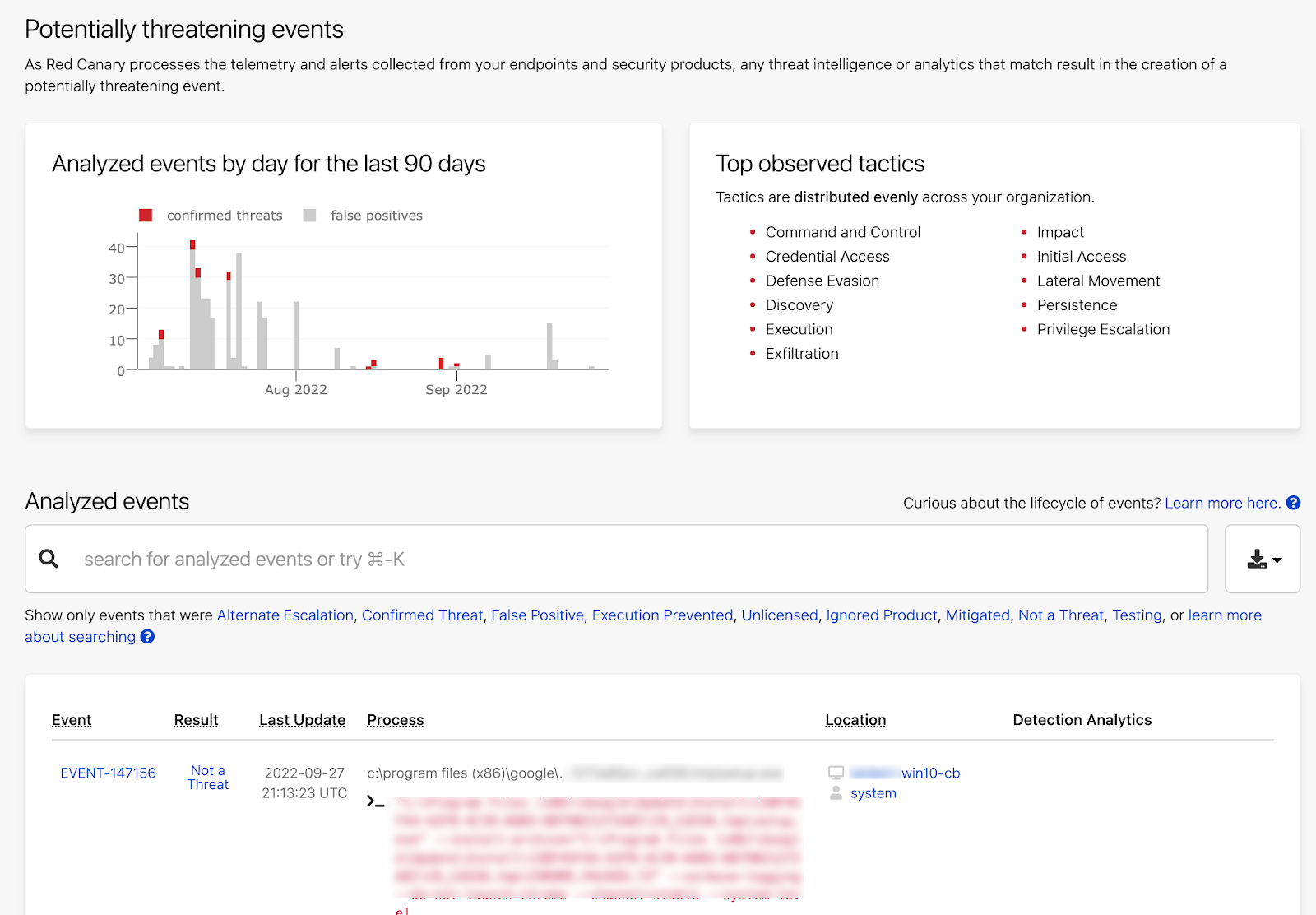
The Analyzed Events dashboard gives you an immediate view into the potential threats Zscaler MDR is identifying in your organization using our threat intelligence and analytics. This page is where you’ll pivot into events if you want to learn more or check our work.
Investigating Potential Threats
Threat hunting is performed by the Zscaler MDR CIRT to exclude the false positives you’re used to from other security products and services. Instead of the legacy approach of simply triaging alerts and forwarding them to you to deal with, Zscaler MDR handles everything up to the point of incident response (some teams call this “tier 1” and “tier 2”).
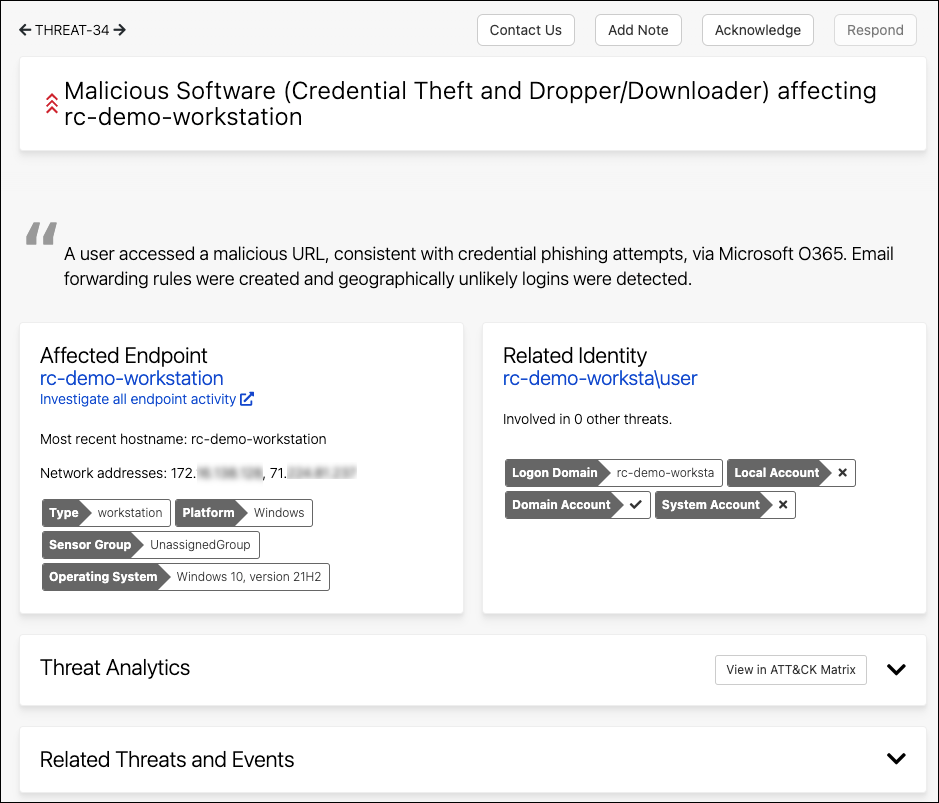
Threats in the Zscaler MDR platform are classified as Unwanted Software, Suspicious Activity, or Malicious Software. Each threat contains the detail your team needs to assess the risk, which people and systems are affected, and the details of what happened.
Responding to Threats
Reducing your time to response is one of our chief goals. Your time to respond is dependent on three activities:
How long it takes to detect and confirm a threat (Zscaler MDR does this for you).
How long it takes you to receive the threat and decide how you want to respond.
How long it takes you to respond.
When you start with the Zscaler MDR platform, the first automation you’ll enable is notifications about confirmed threats via email, phone, SMS, Slack, PagerDuty, etc.
After a few days or weeks, most teams establish their decision-making and response processes (steps 2 and 3) in configurable playbooks that are triggered automatically. Approval steps require manual intervention so you can check and approve each action before it is performed.

The peak of automation maturity is removing the approval safeties and allowing playbooks on endpoints to run without intervention. This enables high-quality response and remediation to take place regardless of where an affected system is located or what time of day it is for your security team.
Active Remediation for Endpoints
If you subscribe to the Zscaler MDR Active Remediation for Endpoints add-on to the platform, Zscaler MDR will respond to identified high- and medium-severity threats by taking remedial action on your covered endpoints via the tools available in your supported EDR software.
After you subscribe, the Zscaler MDR team will work with you to organize your covered endpoints into groups with your instructions as to how each endpoint should be handled in the event of a threat.
Linux EDR
Linux EDR is a Linux based EDR sensor which is deployed to physical, virtual, or cloud-based systems. Linux EDR monitors these systems and returns telemetry to the Zscaler MDR Platform. Telemetry from Linux EDR is analyzed and investigated for threats through the normal process. Within the platform, customers can search their Linux EDR telemetry, and manage deployed sensors.
Security Data Lake
The Security Data Lake is a managed storage solution for Zscaler MDR customers that offers cost-effective, long-term storage for high-volume security logs. Ingest data from a wide range of supported products, store data as long as you need, and retrieve/search/query data as you need.
Managed Phishing Response
Managed Phishing Response is Zscaler MDR’s solution for responding to all user-reported phishing emails. The solution integrates with your organization's inbox reporting button, applying AI-powered triage, rapid expert analysis, and tailored feedback for every user-report. It frees your team from tedious manual reviews, delivers accurate and clear findings, and ensures you always close-the-loop with each reporting user.
Readiness Exercises
Readiness Exercises is a learning experience platform that enables your team to continuously train for real-world situations, so you can get ready and stay ready for today’s top security threats. It is delivered via the Zscaler MDR platform.
Ongoing Health Checks
Zscaler MDR will deploy and set up a series of rulesets and workbooks to baseline, review, and report the health and operational status of your Microsoft Sentinel instance.
Zscaler MDR will routinely review the health and operational status of the Microsoft Sentinel instance, and make you aware of any issues.
Zscaler MDR will meet with you monthly to conduct a health check review of your Microsoft Sentinel environment.
Analytics
Zscaler MDR will conduct ongoing development of analytic rulesets and threat hunting queries for your Microsoft Sentinel deployment based on current threats identified by our detection engineers and intelligence operations.
Zscaler MDR will conduct any necessary tuning of the analytics to your Microsoft Sentinel deployment.
Zscaler MDR will deploy updates to the analytics on a quarterly basis.
Management Support
The subscription includes a package of 20 Microsoft Sentinel Management Support hours per quarter (for a total of 80 hours per year) to be used for the following activities:
Log Source Management
Upon request, Zscaler MDR will facilitate log ingestion into your Microsoft Sentinel instance by leveraging Microsoft and third-party data connectors and build out any necessary data parsers.
Automation and Visualization
Upon request, Zscaler MDR will update or create new automations and visualizations. These activities include building out or refreshing existing workbooks, dashboards, playbooks, and automations within Microsoft Sentinel.
Custom Analytics
Upon request, Zscaler MDR will create custom analytic rulesets and threat hunting queries for Microsoft Sentinel based on your unique requirements. Zscaler MDR will conduct any necessary tuning of the custom analytics to your Microsoft Sentinel deployment.
Health Check Support
Upon request, Zscaler MDR will provide support to address issues identified by the Health Checks.
Reporting on Your Performance
Every great security program continually improves over time, and Zscaler MDR is focused on helping you understand how you’re doing.
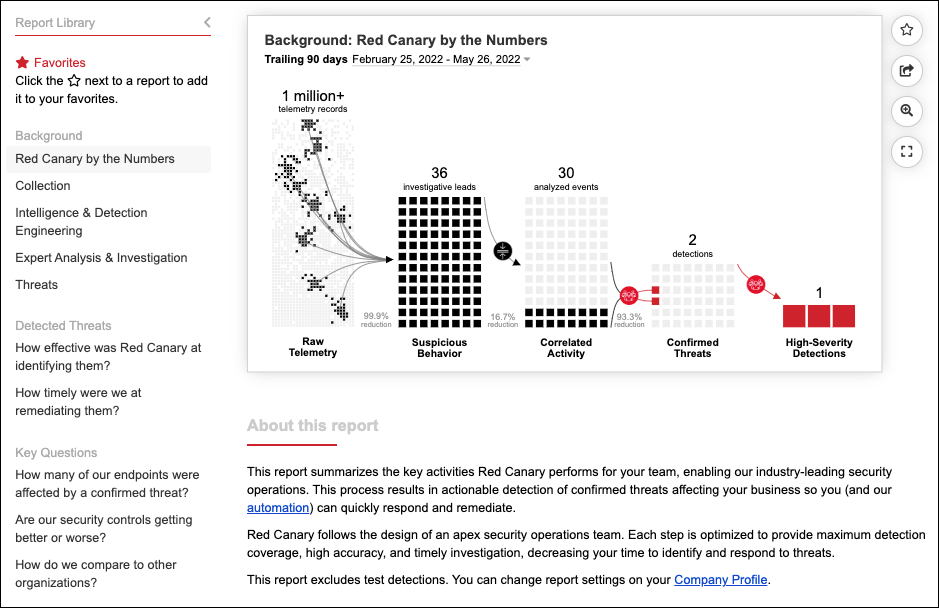
Unlike the typical pie-chart-filled dashboards, Zscaler MDR’s reporting library contains pre-built reports that are designed with help from your peers for inclusion in your executive and board presentations.
Your Ally in the Fight
When an incident occurs, it is not always obvious what to do. The Zscaler MDR team is on-call when you need help and provides proactive security architecture and engineering guidance. Most teams engage with threat hunting in three primary ways:
Periodic sync: Your threat hunter joins a regularly scheduled meeting with your team to review recent detections, discuss security architecture, help with automation, and provide any other security guidance you need.
Immediate assistance: Threat Hunting is on-call 24/7/365 for investigation support and remediation guidance.
Proactive outreach: Our team will proactively communicate with your team if the Zscaler MDR CIRT identifies a critical threat requiring immediate action.